
spine-glfwランタイムドキュメント
ライセンスについて
Spineランタイムをアプリケーションに組み込む前に、必ずSpine Runtimes Licenseを確認してください。
はじめに
spine-glfwは、GLFWとOpenGLを使用してSpineのスケルトンをロード、操作し、レンダリングするためのCおよびC++ベースのランタイムです。
spine-glfwは GLFW 3.0+ と OpenGL 3.3+ を必要とし、Spineの全機能をサポートします。
インストール
spine-glfwランタイムはCおよびC++のAPIとして利用できます。両方のAPIはspine-cおよびspine-cppランタイムを基にしています。spine-cはspine-cppに依存するため、どのAPIを使用する場合でも両方が必要です。
CMakeによる統合(推奨)
spine-glfwをプロジェクトに統合する最も簡単な方法は、CMakeの FetchContent を使用することです:
project(MySpineProject)
include(FetchContent)
FetchContent_Declare(
spine-glfw
GIT_REPOSITORY https://github.com/esotericsoftware/spine-runtimes.git
GIT_TAG 4.3
SOURCE_SUBDIR spine-glfw
)
FetchContent_MakeAvailable(spine-glfw)
# 実行ファイルを作成
add_executable(MyApp main.cpp)
# spine-glfwに対してリンク(spine-cpp、spine-c、GLFW、および glbinding を含む)
target_link_libraries(MyApp spine-glfw)
これにより、spine-glfwとそのすべての依存関係(spine-c, spine-cpp, GLFW, および glbinding)が自動で取得されビルドされます。
手動による統合
手動で統合する場合:
- git (
git clone https://github.com/esotericsoftware/spine-runtimes) でSpineランタイムのソースを取得するか、zipをダウンロードします - 必要なソースファイルをプロジェクトに追加します:
spine-cpp/src、spine-c/src、およびspine-glfw/src/spine-glfw.cppからソースを追加します
- インクルードディレクトリを追加します:
spine-cpp/include,spine-c/include, およびspine-glfw/src - GLFW、OpenGL、glbinding ライブラリにリンクします
C++コードでは、spine-glfw API を利用するために次のヘッダーファイルをインクルードしてください:
注意: spine-glfwは OpenGL 3.3 Core Profile 以上が必要です。ランタイムは頂点配列オブジェクト、頂点バッファオブジェクト、GLSLシェーダーなどのモダンなOpenGL機能を使用します。
サンプル
spine-glfwのサンプルは、Windows、Linux、macOSで動作します。 spine-cppベースの例は example/main.cpp を、spine-cベースの例は example/main-c.cpp を参照してください。
Windows
- Visual Studio Community をインストールします。C++とCMakeのサポートを必ずインストールしてください。
- git (
git clone https://github.com/esotericsoftware/spine-runtimes) でSpineランタイムのソースを取得するか、zipをダウンロードします。 - Visual Studio Communityを開き、ランチャーの Open a local folder ボタンから
spine-glfw/を開きます。 - CMakeの処理が完了するまで待ち、
spine-glfw-example.exeまたはspine-glfw-example-c.exeをスタートアッププロジェクトとして選択してデバッグを開始します。
Linux
- 依存関係をインストールします:bashsudo apt-get install cmake ninja-build libgl1-mesa-dev libx11-dev libxrandr-dev libxinerama-dev libxcursor-dev libxi-dev # Ubuntu/Debian
# またはお使いのディストリビューションに相当するパッケージ - リポジトリをクローンします:
git clone https://github.com/esotericsoftware/spine-runtimes - ビルドして実行します:bashcd spine-runtimes/spine-glfw
./build.sh
./build/debug/spine-glfw-example-c # Cの例を実行
./build/debug/spine-glfw-example # C++の例を実行
macOS
- Xcode をインストールします
- Homebrew をインストールします
- 依存関係をインストールします:bashbrew install cmake ninja
- リポジトリをクローンします:
git clone https://github.com/esotericsoftware/spine-runtimes - ビルドして実行します:bashcd spine-runtimes/spine-glfw
./build.sh
./build/debug/spine-glfw-example-c # Cの例を実行
./build/debug/spine-glfw-example # C++の例を実行
spine-glfwの使い方
spine-glfwランタイムは GLFWとOpenGLを使用して作成されたSpineのアニメーションの再生と操作をサポートします。spine-glfwは汎用の spine-cおよびspine-cppランタイムに基づくCとC++の両実装として提供され、OpenGL APIを利用したロードとレンダリングの実装を追加します。
Spineランタイムのアーキテクチャの詳細についてはSpineランタイムガイドを参照し、作成したSpineのアニメーションをCおよびC++で再生・操作するためのコア APIについてはspine-cとspine-cpp のドキュメントをそれぞれ参照してください。
GLFW向けのエクスポート
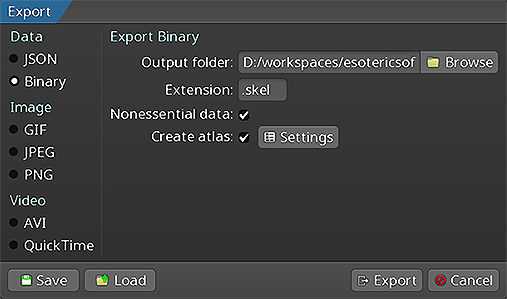 以下の実行方法については、Spineユーザーガイド内で紹介されています :
- JSONまたはバイナリ形式でのスケルトン&アニメーションデータのエクスポート
- スケルトンの画像を含むテクスチャアトラスのエクスポート
スケルトンデータとテクスチャアトラスをエクスポートすると、以下のファイルが得られます :
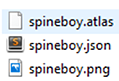
skeleton-name.jsonまたはskeleton-name.skel: これはスケルトンとアニメーションのデータを含んでいます。skeleton-name.atlas: これはテクスチャアトラスの情報を含んでいます。- 1つまたは複数の
.pngファイル: これはテクスチャアトラスの各ページで、スケルトンが使用するイメージを含んでいます。
Spineスケルトンのロード
spine-glfwランタイムはスケルトンのレンダリングにOpenGLを使用します。エクスポートしたファイルからスケルトンをロードする前に、GLFWウィンドウとOpenGLコンテキストを作成する必要があります:
if (!glfwInit()) {
// エラーを処理
return -1;
}
// OpenGLバージョンを 3.3 Core Profile に設定
glfwWindowHint(GLFW_CONTEXT_VERSION_MAJOR, 3);
glfwWindowHint(GLFW_CONTEXT_VERSION_MINOR, 3);
glfwWindowHint(GLFW_OPENGL_PROFILE, GLFW_OPENGL_CORE_PROFILE);
// ウィンドウを作成
GLFWwindow* window = glfwCreateWindow(800, 600, "Spine GLFW", NULL, NULL);
glfwMakeContextCurrent(window);
// OpenGL関数のロードを初期化(例: glbinding)
glbinding::initialize(glfwGetProcAddress);
C API でのロード
void *load_texture(const char *path) {
return (void *)(uintptr_t)texture_load(path);
}
void unload_texture(void *texture) {
texture_dispose((texture_t)(uintptr_t)texture);
}
// アトラスファイルをメモリにロードする
int atlas_length = 0;
uint8_t *atlas_bytes = read_file("data/spineboy-pma.atlas", &atlas_length);
// コールバックでアトラスをロードする
spine_atlas_result atlas_result = spine_atlas_load_callback(
(const char*)atlas_bytes, "data/", load_texture, unload_texture);
spine_atlas atlas = spine_atlas_result_get_atlas(atlas_result);
// スケルトンファイルをメモリにロードする
int skeleton_length = 0;
uint8_t *skeleton_bytes = read_file("data/spineboy-pro.skel", &skeleton_length);
// スケルトンデータをロードする
spine_skeleton_data_result skeleton_result = spine_skeleton_data_load_binary(
atlas, skeleton_bytes, skeleton_length, "data/");
spine_skeleton_data skeleton_data = spine_skeleton_data_result_get_data(skeleton_result);
// ファイルデータを解放
free(atlas_bytes);
free(skeleton_bytes);
C++ API でのロード
spine::GlTextureLoader textureLoader;
spine::Atlas *atlas = new spine::Atlas("data/spineboy-pma.atlas", &textureLoader);
// バイナリからスケルトンデータをロードする
spine::SkeletonBinary binary(*atlas);
spine::SkeletonData *skeletonData = binary.readSkeletonDataFile("data/spineboy-pro.skel");
// または JSON からロードする
spine::SkeletonJson json(*atlas);
spine::SkeletonData *skeletonData = json.readSkeletonDataFile("data/spineboy-pro.json");
ロードしたスケルトンデータとアトラスは、メモリ消費を減らし、同じアトラスデータを共有するスケルトンのバッチレンダリングを可能にするために共有することが推奨されます。
レンダラー
レンダラーシステムは、spine-cとspine-cppに対する spine-glfwの主要な追加機能です。レンダラーはシェーダー、メッシュ、テクスチャを含む OpenGLのレンダリングパイプラインを処理します。
renderer_t *renderer = renderer_create();
renderer_set_viewport_size(renderer, windowWidth, windowHeight);
レンダラーはSpineスケルトンのレンダリングに最適化されたOpenGLシェーダーを自動的に作成・管理します。
スケルトンのレンダリング
spine-glfwはスケルトンおよびスケルトン描画オブジェクトと直接動作するレンダリング関数を提供します。
C API
spine_skeleton_drawable drawable = spine_skeleton_drawable_create(skeleton_data);
spine_skeleton skeleton = spine_skeleton_drawable_get_skeleton(drawable);
spine_animation_state animation_state = spine_skeleton_drawable_get_animation_state(drawable);
// スケルトンを設定
spine_skeleton_set_position(skeleton, 400, 500);
spine_skeleton_set_scale(skeleton, 0.3f, 0.3f);
spine_skeleton_setup_pose(skeleton);
// アニメーションを設定
spine_animation_state_set_animation_1(animation_state, 0, "portal", false);
spine_animation_state_add_animation_1(animation_state, 0, "run", true, 0);
// 更新とレンダリング(メインループ内)
spine_skeleton_drawable_update(drawable, deltaTime);
renderer_draw_c(renderer, skeleton, true); // true は乗算済みアルファテクスチャ用
// クリーンアップ
spine_skeleton_drawable_dispose(drawable);
spine_skeleton_data_dispose(skeleton_data);
spine_atlas_dispose(atlas);
spine_skeleton_data_result_dispose(skeleton_result);
spine_atlas_result_dispose(atlas_result);
C++ API
spine::Bone::setYDown(true);
// スケルトンとAnimationStateを作成
spine::Skeleton skeleton(*skeletonData);
spine::AnimationStateData animationStateData(*skeletonData);
spine::AnimationState animationState(animationStateData);
// スケルトンを設定
skeleton.setPosition(400, 500);
skeleton.setScaleX(0.5f);
skeleton.setScaleY(0.5f);
skeleton.setupPose();
// アニメーションを設定
animationStateData.setDefaultMix(0.2f);
animationState.setAnimation(0, "portal", false);
animationState.addAnimation(0, "run", true, 0);
// 更新とレンダリング(メインループ内)
animationState.update(deltaTime);
animationState.apply(skeleton);
skeleton.update(deltaTime);
skeleton.updateWorldTransform(spine::Physics_Update);
// 画面をクリア
gl::glClear(gl::GL_COLOR_BUFFER_BIT);
// スケルトンをレンダリング
renderer_draw(renderer, &skeleton, true); // true は乗算済みアルファ用
// クリーンアップ
delete skeletonData;
delete atlas;
スケルトンとAnimationStateを操作するためのAPIの詳細については、spine-cおよびspine-cppのドキュメントを参照してください。
クリーンアップ
スケルトンとアトラスデータが不要になったら、メモリを解放してください。
C API
renderer_dispose(renderer);
spine_skeleton_drawable_dispose(drawable);
spine_skeleton_data_dispose(skeleton_data);
spine_atlas_dispose(atlas);
spine_skeleton_data_result_dispose(skeleton_result);
spine_atlas_result_dispose(atlas_result);
// 手動で割り当てたファイルデータを解放
free(atlas_bytes);
free(skeleton_bytes);
// GLFWをクリーンアップ
glfwTerminate();
C++ API
renderer_dispose(renderer);
delete skeletonData;
delete atlas;
// GLFWをクリーンアップ
glfwTerminate();
注: スケルトンデータとアトラスのインスタンスを解放すると、テクスチャローダーを通じて関連するOpenGLテクスチャは自動的に破棄されます。spine-cを使用する場合は、
malloc()/read_file()で割り当てたファイルデータのメモリも自分で解放する必要があります。