
spine-sfmlランタイムドキュメント
ライセンスについて
Spineランタイムをアプリケーションに組み込む前に、必ずSpine Runtimes Licenseを確認してください。
はじめに
spine-sfmlはSFMLを用いてSpineスケルトンをロード、操作、レンダリングするためのC++ベースのランタイムです。
spine-sfmlは SFML 2.6+ を必要とし、Spineのすべての機能をサポートします。
インストール
spine-sfmlランタイムは汎用のspine-cppランタイムに基づいたC++ APIとして利用可能です。
CMakeによる統合(推奨)
spine-sfmlをプロジェクトに統合する最も簡単な方法はCMakeのFetchContentを使うことです:
project(MySpineProject)
include(FetchContent)
FetchContent_Declare(
spine-sfml
GIT_REPOSITORY https://github.com/esotericsoftware/spine-runtimes.git
GIT_TAG 4.3
SOURCE_SUBDIR spine-sfml
)
FetchContent_MakeAvailable(spine-sfml)
# Create your executable
add_executable(MyApp main.cpp)
# Link against spine-sfml
target_link_libraries(MyApp spine-sfml)
これによりspine-sfmlとそのすべての依存(spine-cpp と SFML)が自動的に取得およびビルドされます。
手動による統合
手動で統合する場合:
- git (
git clone https://github.com/esotericsoftware/spine-runtimes) でSpineランタイムのソースを取得するか、zipをダウンロードします。 - プロジェクトに必要なソースファイルを追加します:
spine-cpp/srcのソースとspine-sfml/src/spine-sfml.cppを追加します
- インクルードディレクトリを追加します:
spine-cpp/includeとspine-sfml/src - SFMLライブラリ(sfml-graphics、sfml-window、sfml-system)にリンクします
C++コード内では、次のヘッダをインクルードすると spine-sfml API を使用できます:
注: spine-sfmlは SFML C++ ライブラリの上に構築されています。spine-sfmlの C API は存在しません。
サンプル
spine-sfmlのサンプルは Windows、Linux、Mac OS X で動作します。example/main.cpp を参照してください。
Windows
- Visual Studio Community をインストールします。C++ と CMake のサポートを必ずインストールしてください。
- git (
git clone https://github.com/esotericsoftware/spine-runtimes) を使って Spine Runtimes リポジトリをダウンロードするか、zipをダウンロードします。 - Visual Studio Community を開き、ランチャーの Open a local folder ボタンから
spine-sfml/を開きます。 - CMakeの処理が終わるのを待ち、
spine-sfml-example.exeをスタートアッププロジェクトとして選択してデバッグを開始します。
Linux
- 依存関係をインストールします:bashsudo apt-get install cmake ninja-build libsfml-dev # Ubuntu/Debian
# or equivalent for your distribution - リポジトリをクローンします:
git clone https://github.com/esotericsoftware/spine-runtimes - ビルドして実行します:bashcd spine-runtimes/spine-sfml
./build.sh
./build/debug/spine-sfml-example
macOS
- Xcodeをインストールします
- Homebrewをインストールします
- 依存関係をインストールします:bashbrew install cmake ninja
- リポジトリをクローンします:
git clone https://github.com/esotericsoftware/spine-runtimes - ビルドして実行します:bashcd spine-runtimes/spine-sfml
./build.sh
./build/debug/spine-sfml-example
spine-sfmlの使用方法
spine-sfmlランタイムはSFMLを使って作成されたアニメーションの再生と操作をサポートします。spine-sfmlランタイムはC++で実装され、汎用のspine-cppランタイムに基づいています。SFMLのAPIをベースにしたロードおよびレンダリング実装を追加します。
詳細なSpineランタイムのアーキテクチャについては Spine Runtimes Guide を、C++で作成したSpineのアニメーションを再生・操作するために使用するコアAPIの情報についてはspine-cppのドキュメントを参照してください。
SFML向けのエクスポート
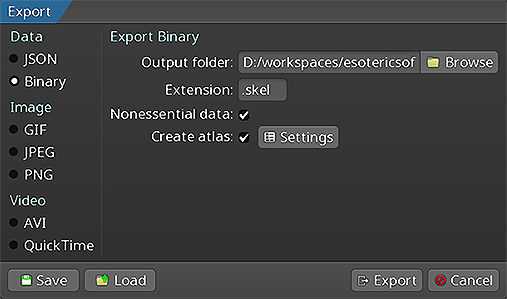 次の手順については Spineユーザーガイドの指示に従ってください:
スケルトンデータとテクスチャアトラスをエクスポートすると、次のファイルが生成されます:
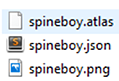
skeleton-name.jsonまたはskeleton-name.skel— スケルトンとアニメーションデータを含みます。skeleton-name.atlas— テクスチャアトラスに関する情報を含みます。- 1 枚以上の
.pngファイル — 各ファイルはテクスチャアトラスのページを表し、スケルトンが使用するパックされた画像を含みます。
Spineスケルトンのロード
spine-sfmlランタイムはSFMLのレンダリング APIを使用してスケルトンを表示します。エクスポートされたファイルからスケルトンをロードする前に、sf::RenderWindow を作成する必要があります:
sf::RenderWindow window(sf::VideoMode(800, 600), "Spine SFML");
window.setFramerateLimit(60);
C++ APIを使ったロード
spine-sfmlランタイムはテクスチャをロードするための SFMLTextureLoader を提供します:
spine::SFMLTextureLoader textureLoader;
// アトラスをロード
spine::Atlas atlas("data/spineboy-pma.atlas", &textureLoader);
// バイナリからスケルトンデータをロード
spine::SkeletonBinary binary(atlas);
spine::SkeletonData *skeletonData = binary.readSkeletonDataFile("data/spineboy-pro.skel");
// またはJSONからロード
spine::SkeletonJson json(atlas);
spine::SkeletonData *skeletonData = json.readSkeletonDataFile("data/spineboy-pro.json");
ロードされたスケルトンデータとアトラスは、メモリ消費を抑え、同じアトラスデータを共有するスケルトンのバッチレンダリングを可能にするために、スケルトンインスタンス間で共有されるべきです。
スケルトンのレンダリング
spine-sfmlはスケルトンを直接扱うシンプルなレンダリング関数を提供します。
spine::Skeleton skeleton(*skeletonData);
spine::AnimationStateData animationStateData(*skeletonData);
spine::AnimationState animationState(animationStateData);
// スケルトンをセットアップ
skeleton.setPosition(400, 500);
skeleton.setScaleX(0.5f);
skeleton.setScaleY(0.5f);
skeleton.setupPose();
// アニメーションをセットアップ
animationStateData.setDefaultMix(0.2f);
animationState.setAnimation(0, "portal", false);
animationState.addAnimation(0, "run", true, 0);
// 更新とレンダリング (メインループ内)
animationState.update(deltaTime);
animationState.apply(skeleton);
skeleton.update(deltaTime);
skeleton.updateWorldTransform(spine::Physics_Update);
// クリアして描画
window.clear(sf::Color::Black);
spine::SFML_draw(skeleton, window, true); // true は乗算済みアルファ用
window.display();
// クリーンアップ
delete skeletonData;
完全な例
以下はSFMLでSpineスケルトンをロードしてレンダリングする方法を示す完全な例です:
#include <SFML/Graphics.hpp>
int main() {
// SFMLウィンドウを作成
sf::RenderWindow window(sf::VideoMode(800, 600), "Spine SFML Example");
window.setFramerateLimit(60);
// アトラスとスケルトンをロード
spine::SFMLTextureLoader textureLoader;
spine::Atlas atlas("data/spineboy-pma.atlas", &textureLoader);
spine::SkeletonJson json(atlas);
spine::SkeletonData* skeletonData = json.readSkeletonDataFile("data/spineboy-pro.json");
if (!skeletonData) {
printf("Failed to load skeleton data\n");
return 1;
}
// スケルトンとAnimationStateを作成
spine::Skeleton skeleton(*skeletonData);
spine::AnimationStateData animationStateData(*skeletonData);
animationStateData.setDefaultMix(0.2f);
spine::AnimationState animationState(animationStateData);
// スケルトンをセットアップ
skeleton.setPosition(400, 500);
skeleton.setScaleX(0.5f);
skeleton.setScaleY(0.5f);
skeleton.setupPose();
// アニメーションをセットアップ
animationState.setAnimation(0, "portal", false);
animationState.addAnimation(0, "run", true, 0);
// メインループ
sf::Clock clock;
while (window.isOpen()) {
// イベントを処理
sf::Event event;
while (window.pollEvent(event)) {
if (event.type == sf::Event::Closed) {
window.close();
}
}
// アニメーションを更新
float deltaTime = clock.restart().asSeconds();
animationState.update(deltaTime);
animationState.apply(skeleton);
skeleton.update(deltaTime);
skeleton.updateWorldTransform(spine::Physics_Update);
// クリアして描画
window.clear(sf::Color::Black);
spine::SFML_draw(skeleton, window, true);
window.display();
}
// クリーンアップ
delete skeletonData;
return 0;
}
詳細なスケルトンやAnimationStateを操作するためのAPIについては、spine-cppのドキュメントを参照してください。
クリーンアップ
不要になったスケルトンやアトラスのデータはメモリを解放してください:
delete skeletonData;
// アトラスは上の例ではスタック上に割り当てられているため、自動的にクリーンアップされます
// new で割り当てた場合は delete してください:
// delete atlas;
注: スケルトンデータやアトラスインスタンスを解放すると、テクスチャローダーを通じて関連するSFMLテクスチャも自動的に破棄されます。